




Copyright 2010-2026. Privacy Policy | Terms of Use info@karaoke5.com
Video - Mp3 - Midi - Basi Karaoke. Professional karaoke program. Free karaoke program.
Karaoke Software for DJs That Runs the Room

Choose karaoke software for DJs that handles requests, singers, lyrics, media formats, and dual screens without slowing down your live show every night.
A karaoke night can turn from packed dance floor to dead air in about ten seconds. It happens when a singer cannot find their song, the wrong lyrics hit the TV, or the host is still digging through folders while the room waits. The right karaoke software for DJs keeps those moments offstage, so you can focus on the music, the singers, and the next big reaction.
For a DJ or KJ, karaoke software is not just a player. It is the control center for your library, singer rotation, lyric screens, requests, announcements, and transitions. The best setup depends on your show, but the goal stays the same: keep the room moving without making the technology the main event.
🎙What Karaoke Software for DJs Must Control
A music player can handle background tracks. A real karaoke system has to manage people. That means knowing who is up next, what they requested, whether their track is ready, and where the lyrics need to appear. It also means being able to react when a singer changes their mind, a regular arrives late, or a group decides they need one more song before last call.
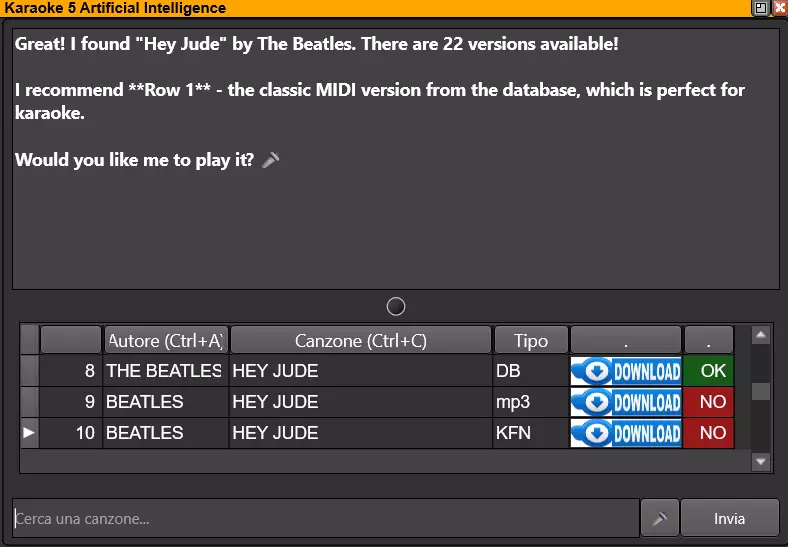
Start with a system that gives you a clear main window for search, playback, and the active queue. You should be able to find a track by artist, title, or keyword without scrolling through a file browser in front of customers. Performance-focused search matters most when your library is large and requests are coming in faster than you can write them down.
Singer scheduling is equally important. A fair rotation keeps regulars happy, gives new guests a turn, and prevents one table from taking over the night. Look for queue controls that let you add, move, skip, or hold singers quickly. The screen should tell you what is playing, who is next, and what is waiting, all without forcing you to stop the current performance.
🎧Start With the Media You Already Use
Changing software should not mean rebuilding your entire karaoke collection. DJs often work with a mix of older karaoke discs, downloaded files, music tracks, videos, and custom creations. Before choosing a platform, check whether it plays the formats that actually live in your library.
Useful compatibility includes CD+G for classic karaoke tracks, plus MIDI, KAR, KFN, MP3, WMA, MP4, and FLV files. Support for dedicated karaoke formats and score-based files can also matter if you run themed events, contests, or interactive game nights. The broader the format support, the less time you spend converting files or maintaining separate programs for different types of content.
There is a trade-off. A giant library is only useful if it is organized. Use consistent artist and title information, remove duplicate files, and store your collection on a dependable local drive or properly managed external drive. A search tool can only be fast when the underlying database is clean enough to trust.
Keep Requests and Rotation Moving
Paper slips still work at a small house party. They become a bottleneck in a busy bar. DJs need a way to collect requests without losing names, misreading handwriting, or interrupting a conversation at the booth every two minutes.
Mobile singer management changes that workflow. Guests can browse songs and send reservations from a smartphone while you keep control of approval and rotation. This gives customers a better experience because they can search at their table, and it gives the host breathing room because every request arrives in one place.
Do not hand over full control just because a system offers mobile features. The host should still be able to review requests, correct song versions, block duplicate entries, and decide when a singer joins the queue. At a private party, you may want open requests and a loose order. At a weekly venue show, approval and rotation rules protect the pace of the night.
A strong playlist tool also helps when karaoke and DJ sets share the same event. Build a short list of walk-up music, dinner tracks, party starters, and closing songs before guests arrive. Then you are never scrambling to fill the gap between singers. If a performer does not show up, you can launch a track, make an announcement, and move forward without awkward silence.
Put Lyrics Where the Crowd Needs Them
Your audience should see lyrics. You should see control. Those are different jobs, and a professional karaoke setup treats them that way.
A double-screen output lets the main display show synchronized lyrics, video, or branded visuals while your computer stays focused on the queue, search results, and show controls. For larger rooms, the ability to send a TV window to a second display is not a luxury. It is how you avoid turning your booth monitor toward the audience and losing control of the show.
Check lyric timing before a performance begins, especially with new files or tracks you created yourself. Good synchronization makes singers feel supported. Bad timing makes even confident performers hesitate. If you create karaoke versions from music or video, use tools that let you edit and synchronize lyrics carefully rather than hoping the words line up on their own.
Visual control can also support the business. During a break, display upcoming events, drink specials, a birthday message, or a simple prompt telling guests how to submit a request. The best message is short enough to read from across the room and useful enough that customers act on it.
Control the Energy, Not Just Playback
A karaoke show is live entertainment. You need more than a play button when a seven-minute ballad lands in the wrong part of the night or a singer decides halfway through that they picked the wrong key.
Mixer and mix-control functions let you adjust volume, fade between tracks, stop a song immediately when necessary, and keep music ready underneath announcements. Use those controls with judgment. Cutting someone off without warning can sour a room, but letting an unsuitable track run too long can drain the energy from everyone else.
Vocal-removal tools give DJs another useful option. If a guest wants to sing over a standard music track, real-time vocal reduction can turn more of your music collection into possible karaoke material. Results vary by recording because vocals are mixed differently from song to song, so preview the track before putting a singer on the spot. It is a practical extra, not a replacement for a properly produced karaoke version.
YouTube search, preview, and download functions can also help fill a specific request when it is not in your local catalog. Use them as a controlled extension of your library, not your entire strategy. Venue internet can be unpredictable, and last-minute searching can distract from the performers already in the room. Download and prepare reliable material ahead of time whenever possible.
Build a Show Workflow Before Doors Open
The easiest way to run karaoke is to make the decisions before the first singer arrives. Test your audio outputs, lyric display, microphones, and second-screen connection. Open your main playlist, check the queue, and make sure your search database can see every library location you plan to use.
Create a simple operating routine. Open with a few dependable crowd songs. Confirm each singer's name and version before their turn. Start the next track as the current singer finishes. Keep a backup playlist ready for no-shows, technical pauses, and moments when the room needs a reset.
It also helps to separate library maintenance from show time. Add new tracks, fix tags, build playlists, and test lyric files earlier in the day. During the event, your job is to host. You should not be sorting folders or troubleshooting file names while someone is waiting at the microphone.
Karaoke5 brings those jobs into one desktop workflow, combining format playback, synchronized lyrics, queue and playlist management, second-screen output, mobile reservations, music mixing, and karaoke-track creation tools. That all-in-one approach is especially useful when you run regular shows and want fewer separate programs competing for your attention.
Choose for Your Room, Not a Feature Checklist
Home parties and professional venues need different levels of control. A casual host may only need easy search, lyrics on a TV, and a manageable playlist. A mobile DJ, bar operator, or dedicated KJ may need singer scheduling, customer requests, database search, multiple displays, announcements, and a workflow that holds up week after week.
Free software is a smart way to test how a program feels with your own files and equipment. Paid editions become worthwhile when the show depends on advanced output, higher-volume queue management, deeper library control, or professional tools that save time every event. The real cost is not only the license. It is the time lost when your software cannot keep up with the room.
Set up your first show with a clean queue, a tested lyric screen, and three reliable backup songs. Once those basics are under control, every request becomes an opportunity to make the night louder, friendlier, and more memorable.